-
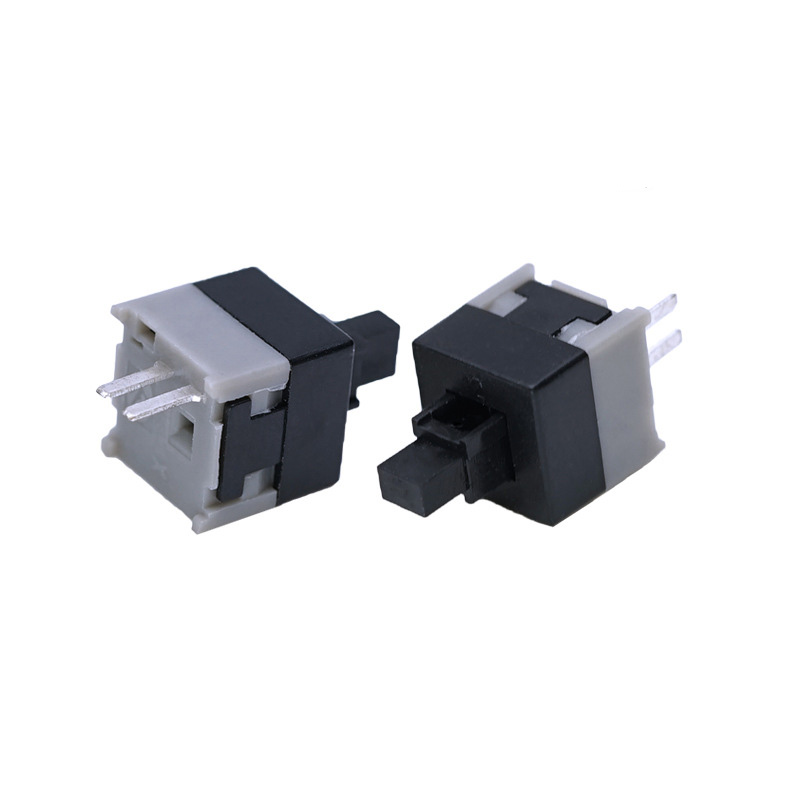
self locking switch with soldering wire
This self-locking switch features a push-on, push-off mechanism that maintains its state until pressed again. It comes with pre-attached soldering wires for quick and secure permanent installation into your electronic projects.
Designed for reliability, our latching switch ensures a stable circuit connection and is ideal for industrial controls, power supplies, and DIY electronics. The integrated soldering terminals allow for a strong, permanent wire connection.
Feature Highlights:
∙
Self-Locking (Latching) Action: The switch stays engaged after being pressed, preventing accidental shut-offs.∙
Pre-Soldered Wires: Includes attached wires for easy soldering, simplifying the assembly process.∙
Durable Construction: Built to last for use in high-demand applications.∙
Simple Integration: Easily embedded into various devices like instruments, automation systems, and home projects. -
6 pins 8.5mm push button switch Computer Case Power Button switch
Product name: Push Button Switch/ self locking switch
Operation Type: Momentary type /Latching type
Rating: DC 30V 0.1A
voltage: 12V or 3V, 5V, 24V, 110V, 220V
Contact Configuration: 1NO1NC
Computer Case Power Button
1. Standard Term: Power Button
This is the universal term for the primary switch on a computer case. Its symbol is the broken circle with a vertical line (IEC 5009), which is the international standard symbol for power.
2. Primary Function:
The primary function of the power button is to send a momentary signal to the computer’s motherboard to initiate the boot process. In modern systems, it is a “soft” switch, meaning it doesn’t physically cut power but instructs the operating system to begin a controlled shutdown or hibernation when pressed briefly while the computer is running.
3. Physical Design and Features:
- ∙Momentary Switch: It is not a latching or toggle switch. It is designed to be pressed and released, making a momentary contact.
- ∙Tactile Feedback: Most buttons provide physical or audible feedback (a click) to confirm the press.
- ∙LED Indicator: It is almost always integrated with a Light-Emitting Diode (LED). This LED illuminates (often in white, blue, or green) to indicate that the computer is powered on. In sleep mode, it may blink.
4. Common Location:
The power button is typically located on the front panel of the computer case, often on the top-right or top-left section for easy access. On full-tower cases, it may be on the top face.
5. Related Button: Reset Button
Many computer cases also feature a secondary, smaller button called the Reset Button. This button forces an immediate hardware reboot by restarting the motherboard’s circuitry, which is useful if the operating system becomes completely unresponsive. It is usually located directly next to or near the power button.
-
8.5mm push button switch Computer Case Reset Button switch with light
Product name: Push Button Switch/ self locking switch
Operation Type: Momentary type /Latching type
Rating: DC 30V 0.1A
voltage: 12V or 3V, 5V, 24V, 110V, 220V
Contact Configuration: 1NO1NC
Computer Case Power Button
1. Standard Term: Power Button
This is the universal term for the primary switch on a computer case. Its symbol is the broken circle with a vertical line (IEC 5009), which is the international standard symbol for power.
2. Primary Function:
The primary function of the power button is to send a momentary signal to the computer’s motherboard to initiate the boot process. In modern systems, it is a “soft” switch, meaning it doesn’t physically cut power but instructs the operating system to begin a controlled shutdown or hibernation when pressed briefly while the computer is running.
3. Physical Design and Features:
- ∙Momentary Switch: It is not a latching or toggle switch. It is designed to be pressed and released, making a momentary contact.
- ∙Tactile Feedback: Most buttons provide physical or audible feedback (a click) to confirm the press.
- ∙LED Indicator: It is almost always integrated with a Light-Emitting Diode (LED). This LED illuminates (often in white, blue, or green) to indicate that the computer is powered on. In sleep mode, it may blink.
4. Common Location:
The power button is typically located on the front panel of the computer case, often on the top-right or top-left section for easy access. On full-tower cases, it may be on the top face.
5. Related Button: Reset Button
Many computer cases also feature a secondary, smaller button called the Reset Button. This button forces an immediate hardware reboot by restarting the motherboard’s circuitry, which is useful if the operating system becomes completely unresponsive. It is usually located directly next to or near the power button.
-
On-off unlock Self locking Swtich KFC-01-58F-6GW
Product name: Push Button Switch/ self locking switch
Operation Type: Momentary type /Latching type
Rating: DC 30V 0.1A
voltage: 12V or 3V, 5V, 24V, 110V, 220V
Contact Configuration: 1NO1NC
-
On-off unlock Self locking Swtich KFC-01-58D-8GZ
Product name: Push Button Switch/ self locking switch
Operation Type: Momentary type /Latching type
Rating: DC 30V 0.1A
voltage: 12V or 3V, 5V, 24V, 110V, 220V
Contact Configuration: 1NO1NC
-
On-off unlock Self locking Swtich KFC-01-580-3GZ
Product name: Push Button Switch/ self locking switch
Operation Type: Momentary type /Latching type
Rating: DC 30V 0.1A
voltage: 12V or 3V, 5V, 24V, 110V, 220V
Contact Configuration: 1NO1NC
-
2 pins 7x 7 On-off unlock Self locking Swtich KFC-02-700-2PZ
Product name: Push Button Switch/ self locking switch
Operation Type: Momentary type /Latching type
Rating: DC 30V 0.1A
voltage: 12V or 3V, 5V, 24V, 110V, 220V
Contact Configuration: 1NO1NC
-
6 pins 7x 7 On-off green color Self locking Swtich KFC-02-700-6GZ
Product name: Push Button Switch/ self locking switch
Operation Type: Momentary type /Latching type
Rating: DC 30V 0.1A
voltage: 12V or 3V, 5V, 24V, 110V, 220V
Contact Configuration: 1NO1NC
-
6 pins 7x 7 On-off green color Self locking Swtich KFC-02B-700-8GZ
Product name: Push Button Switch/ self locking switch
Operation Type: Momentary type /Latching type
Rating: DC 30V 0.1A
voltage: 12V or 3V, 5V, 24V, 110V, 220V
Contact Configuration: 1NO1NC
-
2 pins 8.5mm On-off latching Self locking Swtich KFC-04-845-2GJ
Product name: Push Button Switch/ self locking switch
Operation Type: Momentary type /Latching type
Rating: DC 30V 0.1A
voltage: 12V or 3V, 5V, 24V, 110V, 220V
Contact Configuration: 1NO1NC
-
6 pins 8.5mm On-off latching Self locking Swtich KFC-05B-850-6GZ
Product name: Push Button Switch/ self locking switch
Operation Type: Momentary type /Latching type
Rating: DC 30V 0.1A
voltage: 12V or 3V, 5V, 24V, 110V, 220V
Contact Configuration: 1NO1NC
-
12 pins 8.5mm double row On-off latching Self locking Swtich KFC-08-850-12GZ
Product name: Push Button Switch/ self locking switch
Operation Type: Momentary type /Latching type
Rating: DC 30V 0.1A
voltage: 12V or 3V, 5V, 24V, 110V, 220V
Contact Configuration: 1NO1NC